- HubSpot Community JP
- RevOps & Data Hub
- Data Hub
- BigQuery connector
BigQuery connector
Data Hub
を検索する
オプション
- RSSフィードに登録
- 新規の投稿として表示
- トピックを既読としてマーク
- ピンする
- ブックマーク
- フォロー
- ミュート
- 印刷用ページ

SDEGLIAME
11 20, 2025 8:54 AM
参加者
Hello!
I work on a HubSpot Enterprise account.
The knowledge base talks about a Google BigQuery connector in beta.
However, this beta doesn't appear in my Marketplace, so I can't request access to the beta programme. Has anyone else had this problem?
解決済! 解決策の投稿を見る。
- 新着としてマーク
- ブックマーク
- 購読
- ミュート
- RSS フィードを購読する
- ハイライト
- 印刷
- 不適切なコンテンツを報告
2件の承認済みベストアンサー

解決策
Jaycee_Lewis
11 20, 2025 10:44 AM
ソートリーダー
Hey, @SDEGLIAME  I was able to find it from my Enterprise portal. Here's what worked for me:
- Click my Profile pic (upper right side)
- Scroll down to Product Updates
- Made sure it was viewing “All” and not “New to me”
- Made sure I pasted in this exact term “Access HubSpot data in Google BigQuery”
- (make sure you don't accidentally paste it into the Global Search like I did the first time
 )
)
Screenshots for context
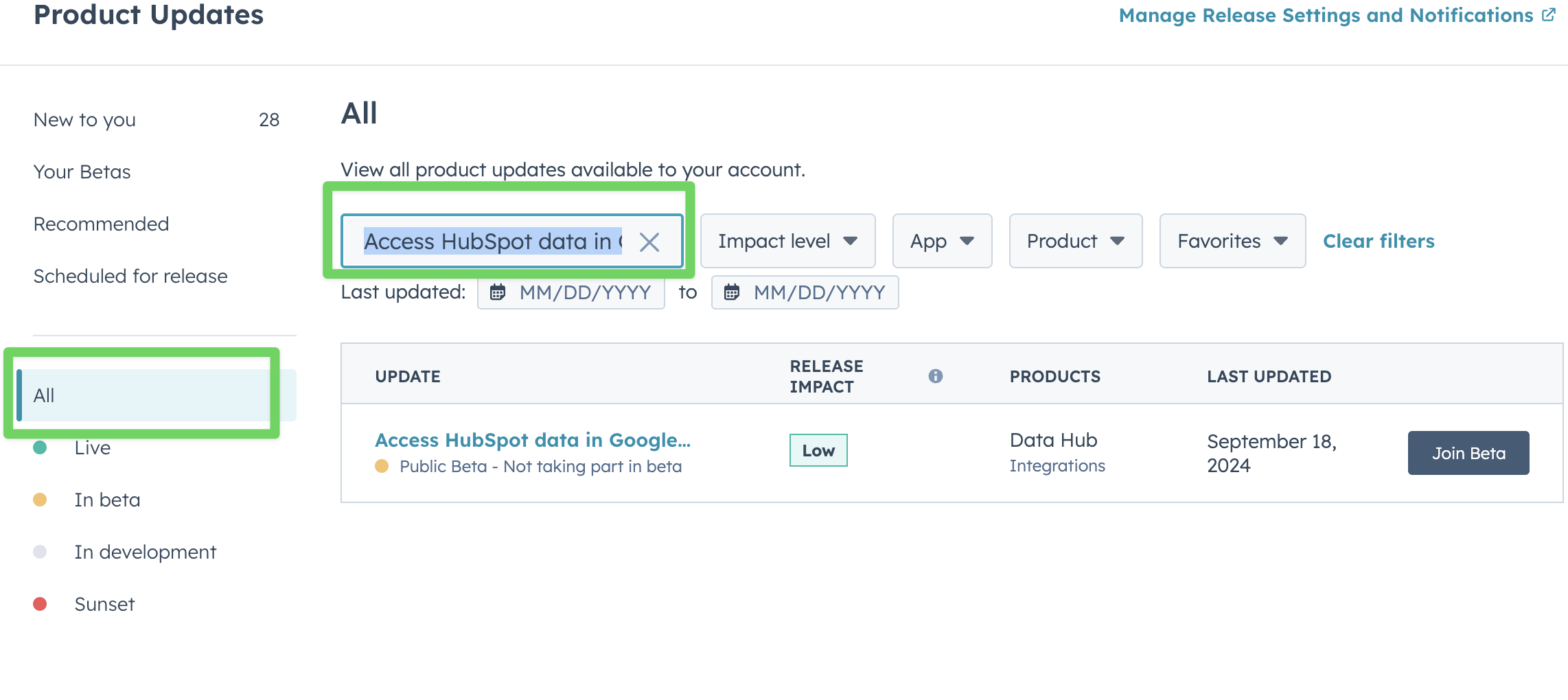
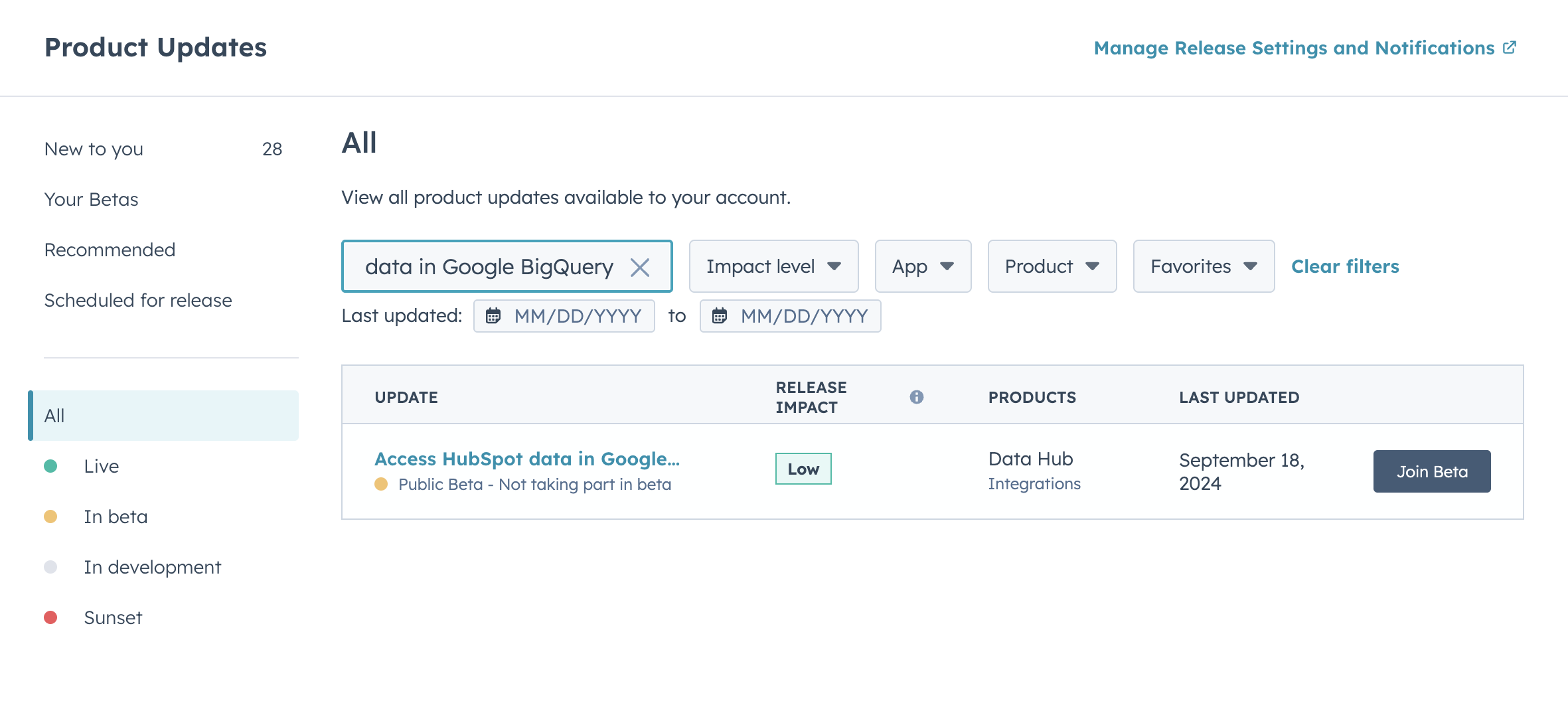
Hope that helps! — Jaycee
 | Loop Marketing is a new four-stage approach that combines AI efficiency and human authenticity to drive growth. Learn More |
- 新着としてマーク
- ブックマーク
- 購読
- ミュート
- RSS フィードを購読する
- ハイライト
- 印刷
- 不適切なコンテンツを報告

解決策
RubenBurdin
12 15, 2025 3:41 PM
ガイド役
Hi @SDEGLIAME , Jaycee’s answer is spot on, and your experience is pretty typical with HubSpot betas.
One thing worth adding for anyone else who hits this in 2025: betas don’t always surface in the Marketplace at all, even on Enterprise.
Many of them are exposed only through Product Updates or via a direct enablement flag on the portal. That’s why searching the Marketplace itself often comes up empty, even when the docs mention the feature.
If it still doesn’t appear after checking Product Updates, the usual reasons are:
-
The beta is rolled out in waves and not enabled for your region yet.
-
Your portal is Enterprise, but the beta is limited to specific Enterprise SKUs or data regions.
-
The feature is visible, but only Super Admins can request or enable it.
At that point, the fastest path isn’t the Marketplace, it’s opening a support ticket and explicitly asking to be added to the “Access HubSpot data in Google BigQuery” beta by name. Support can confirm eligibility pretty quickly. Glad you got it working, and thanks for confirming the solution. Threads like this save a lot of head-scratching for the next person who goes looking for a beta that’s technically “there,” just not where you’d expect it.
Did my answer help? Please mark it as a solution to help others find it too.
 | Ruben Burdin HubSpot Advisor Founder @ Stacksync Real-Time Data Sync between any CRM and Database |
 | |
- 新着としてマーク
- ブックマーク
- 購読
- ミュート
- RSS フィードを購読する
- ハイライト
- 印刷
- 不適切なコンテンツを報告
4件の返信 4
解決策
RubenBurdin
12 15, 2025 3:41 PM
ガイド役
Hi @SDEGLIAME , Jaycee’s answer is spot on, and your experience is pretty typical with HubSpot betas.
One thing worth adding for anyone else who hits this in 2025: betas don’t always surface in the Marketplace at all, even on Enterprise.
Many of them are exposed only through Product Updates or via a direct enablement flag on the portal. That’s why searching the Marketplace itself often comes up empty, even when the docs mention the feature.
If it still doesn’t appear after checking Product Updates, the usual reasons are:
-
The beta is rolled out in waves and not enabled for your region yet.
-
Your portal is Enterprise, but the beta is limited to specific Enterprise SKUs or data regions.
-
The feature is visible, but only Super Admins can request or enable it.
At that point, the fastest path isn’t the Marketplace, it’s opening a support ticket and explicitly asking to be added to the “Access HubSpot data in Google BigQuery” beta by name. Support can confirm eligibility pretty quickly. Glad you got it working, and thanks for confirming the solution. Threads like this save a lot of head-scratching for the next person who goes looking for a beta that’s technically “there,” just not where you’d expect it.
Did my answer help? Please mark it as a solution to help others find it too.
| | Ruben Burdin HubSpot Advisor Founder @ Stacksync Real-Time Data Sync between any CRM and Database |
| | |
- 新着としてマーク
- ブックマーク
- 購読
- ミュート
- RSS フィードを購読する
- ハイライト
- 印刷
- 不適切なコンテンツを報告
解決策
Jaycee_Lewis
11 20, 2025 10:44 AM
ソートリーダー
Hey, @SDEGLIAME I was able to find it from my Enterprise portal. Here's what worked for me:
- Click my Profile pic (upper right side)
- Scroll down to Product Updates
- Made sure it was viewing “All” and not “New to me”
- Made sure I pasted in this exact term “Access HubSpot data in Google BigQuery”
- (make sure you don't accidentally paste it into the Global Search like I did the first time )
Screenshots for context
Hope that helps! — Jaycee
| Loop Marketing is a new four-stage approach that combines AI efficiency and human authenticity to drive growth. Learn More |
- 新着としてマーク
- ブックマーク
- 購読
- ミュート
- RSS フィードを購読する
- ハイライト
- 印刷
- 不適切なコンテンツを報告
SDEGLIAME
11 20, 2025 11:19 AM
参加者
Thanks a lot, Jaycee !
- 新着としてマーク
- ブックマーク
- 購読
- ミュート
- RSS フィードを購読する
- ハイライト
- 印刷
- 不適切なコンテンツを報告
Jaycee_Lewis
11 20, 2025 11:27 AM
ソートリーダー
I'm glad that helped  Have a great rest of your day! — Jaycee
| Loop Marketing is a new four-stage approach that combines AI efficiency and human authenticity to drive growth. Learn More |
- 新着としてマーク
- ブックマーク
- 購読
- ミュート
- RSS フィードを購読する
- ハイライト
- 印刷
- 不適切なコンテンツを報告


BigQuery connector
Hi @SDEGLIAME , Jaycee’s answer is spot on, and your experience is pretty typical with HubSpot betas.
One thing worth adding for anyone else who hits this in 2025: betas don’t always surface i...
Hi @SDEGLIAME , Jaycee’s answer is spot on, and your experience is pretty typical with HubSpot betas.
One thing worth adding for anyone else who hits this in 2025: betas don’t always surface i...
Operations
Dec 15, 2025